v1.0.0 · free forever · no account

Record your routine replay it endlessly.

Do something once, then let Macro Recorder repeat it exactly. Unlike older tools, it captures every keystroke plus mouse movement — so it works for data entry, gaming, testing, or anything you've typed before and don't want to type again.

No ads, no trackingNo account requiredCompletely free to usev1.0.0
Records keystrokes & mouseReplay on hotkeyLoop as many times neededSmall 13.7 MB downloadWorks in fullscreen games
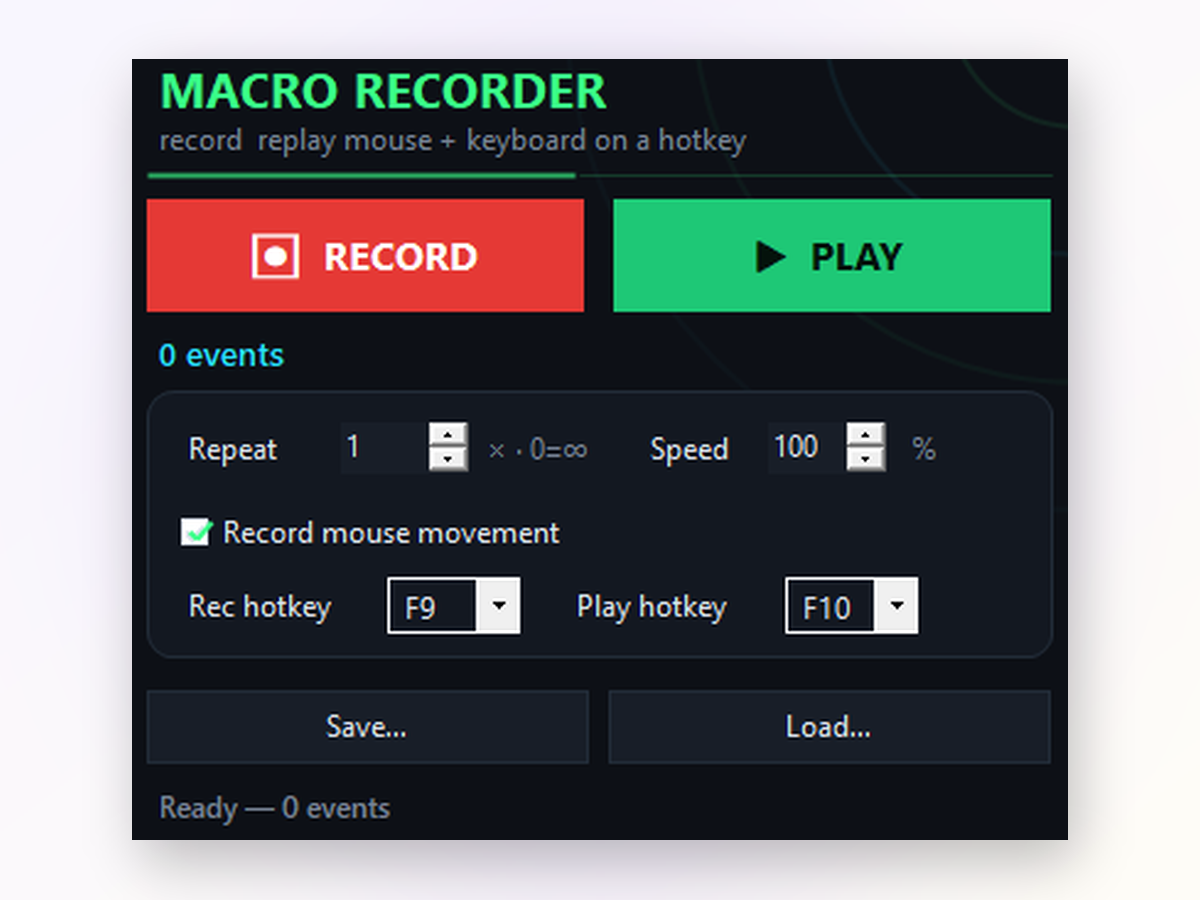
Macro Recorder app window on Windows
Real-world use cases
Inside the appMacro Recorder window

See what Macro Recorder captures and plays back.

Every click, every keystroke, every mouse move — recorded precisely and replayed identically. Speed up, slow down, or run at original pace.

Game combos and farming loopsRecord your button sequence once, then repeat it hundreds of times without lifting a finger.
Form filling and data entryType the same fields, click the same buttons, move to the next row — the macro handles it all.
Testing repetitive stepsRecord a test scenario and replay it over and over to verify your app behaves the same way.
What's included

What you are downloading.

Version1.0.0
PlatformWindows 10 and 11, 64-bit
InstallPortable, no installer
LicenseMIT, source on GitHub
PriceFree, no account
LanguageEnglish
vs. older tools

How Macro Recorder stacks up against older tools.

The gap between classic macro recorders and modern automation.

Keyboard recording
Full support
Mouse only
User interface
Clear buttons & settings
Cryptic toolbar
Hotkey replay
Works everywhere
Often blocked in games
Loop & speed control
Yes, both included
Limited or absent
Size & setup
Portable, 13.7 MB
Installer required
Active development
Regularly updated
Abandoned years ago
Getting started

How to automate your first routine.

Three steps from opening the app to running your macro on repeat.

Common questions

Questions about recording and playback

Does it work in online games and full-screen apps?

Yes. Macro Recorder sends input as hardware scan codes, so it works in full-screen games, web browsers, and remote sessions. F9 and F10 trigger recording and playback from any window.

Can I save and reuse my macros?

Absolutely. Every macro is saved as a file. Load it back anytime to replay the same routine without re-recording.

What if I make a mistake while recording?

Just delete the macro and re-record. There's no undo for a single action, so it's best to start fresh if you notice an error.

Will antivirus or Windows Defender flag it?

Macro Recorder is open-source and signed. On first download, Windows may show a SmartScreen warning because it's new; click Run anyway. Reputation builds as more people download.

Can I adjust the speed while the macro is playing?

No, you set the speed before playback. But you can press F10 again or Stop to halt immediately and start over at a different pace.

Does it work on Windows 7 or older versions?

Macro Recorder requires Windows 8.1 or newer. Windows 10 and 11 work perfectly.

Will my macro work on a different monitor resolution?

Mouse movement macros are resolution-dependent, so they may not click the same spot on a different screen size. Clicks-and-keys-only mode works anywhere.
Why it's better

Why use Macro Recorder instead of alternatives.

It records what you actually do — keyboard included — and stays lightweight.

01

Keyboard support built in

Older tools only saw mouse clicks. Macro Recorder captures every keystroke, so you can automate typing, shortcuts, and form input. Not just the clicks.

02

Global hotkeys, even in games

Press F9 to record and F10 to play, no matter which window is open. Works in fullscreen games and remote sessions because it sends input as hardware scan codes.

03

One file, no account, no bloat

Download a single portable file. No installer dialogs, no online account, no ads between recordings. Just open and record.

04

Speed it up or slow it down

Replay at 10% of the original speed for precision, or blast through at 1000% to save time. Adjust on the fly before each playback.

Stop repeating the same steps by hand.

Download Macro Recorder, record your routine once, and let it run on demand — as many times as you need.

Download for Windows
Latest release · v1.0.0